
Family Feud for Work: The Ultimate Team-Building Game Guide
Not every team-building activity needs a complicated challenge, an expensive venue or an afternoon of awkward icebreakers.
Sometimes, all you need is a good question, two competing teams and a room full of coworkers convinced they know the most popular answer.
That's the appeal of Family Feud for work.
A survey-style game can turn a regular office meeting, staff social or corporate event into something interactive. Coworkers discuss answers, make predictions, celebrate surprising guesses and compete for points.
And unlike a traditional trivia competition, participants don't need specialist knowledge to contribute.
You can run a short version in 15 minutes, organize a full 60-minute team-building event or bring the game online for remote employees.
This guide covers everything: setup, rules, questions, scoring, group sizes, virtual hosting and practical ways to keep the game enjoyable for everyone.

Family Feud for Work: Quick Planning Guide
EventGroup sizeTimeRecommended formatMeeting icebreaker6–1210–15 min2–3 quick roundsTeam-building session10–3030–45 minTwo teams, rotating playersOffice party10–5030–60 minHosted game showCorporate event30–100+45–60 minRepresentatives and audienceRemote team social6–3020–40 minVideo call and shared game boardDepartment tournament20–100+45–90 minMultiple matches and a final
These are suggested formats, not fixed player limits. Large events work best when a host rotates representatives and gives the audience opportunities to participate.
What Is Family Feud for Work?
Family Feud for work is a workplace adaptation of the familiar survey-style guessing game.
Two teams compete to uncover answers hidden on a board.
The host asks a question such as:
Name something people do right before a meeting starts.
The board might contain:
- Check email — 32 points
- Get coffee — 25 points
- Review notes — 17 points
- Chat with coworkers — 12 points
- Open the meeting link — 8 points
Players try to guess those answers.
Correct guesses reveal answers and earn points. Incorrect guesses earn strikes. After three strikes, the opposing team can attempt to steal the round.
The questions can focus on office life, everyday experiences, remote work, company culture or lighthearted general knowledge.
Important: The example point values in this guide are editorial suggestions, not verified results from a survey. If you want authentic survey rankings, collect responses from employees beforehand.
Why Use Family Feud as a Team-Building Activity?
It gives coworkers a shared goal
Players discuss possible answers and work toward a common score.
A sales employee, developer, office administrator and new hire can contribute to the same team.
It doesn't require specialist trivia knowledge
The challenge is predicting common responses rather than remembering obscure facts.
That makes the format approachable for groups with different roles, backgrounds and experience levels.
It creates natural conversation
An answer like “check the calendar” might spark a familiar office joke.
An unexpected answer can become the most memorable moment of the game.
It adapts to different events
You can use Family Feud for a quick meeting opener, onboarding activity, department social, conference session or end-of-year celebration.
The game stays familiar while the questions and presentation change.
It works with one shared screen
For an in-person event, employees don't need to join a separate game on their phones.
A host can control the game while everyone watches the board on a projector or television.
For example, Familio Games' Family Feud team-building setup supports ready-made and custom workplace questions, a private host controller, live scoring, strikes and a separate audience display.
How to Play Family Feud at Work: Step by Step
Here's a practical hosting method for a company event.
Step 1: Choose the Event Format
Start with three decisions:
How many people are attending?
How much time do you have?
Is the event in person, remote or hybrid?
For a 15-minute meeting opener, use two or three quick questions.
For a 45-minute office social, prepare around eight questions and a final round.
For a large corporate event, designate active players and involve the wider audience through team discussion and cheering.
Step 2: Prepare Workplace-Friendly Questions
Choose questions with several plausible answers.
Good:
Name something that can interrupt a video meeting.
Less suitable:
What year was our company founded?
The second is a trivia question with one factual answer.
A good Family Feud board has multiple possible answers that people can reasonably predict.
Mix everyday topics with a few questions about your company.
Avoid making every round depend on internal jokes that new employees or external guests won't understand.
Step 3: Divide Coworkers Into Two Teams
For smaller groups, divide participants evenly.
For larger groups, create two main teams and rotate representatives.
If your goal is meeting colleagues from other departments, mix employees who don't usually work together.
If you're hosting a friendly departmental competition, you can use department-based teams instead.
Give each team a name.
Examples include:
The Brainstormers vs The Deadline Dodgers
Marketing vs Sales
Team Coffee vs Team Tea
The Spreadsheet Wizards vs The Inbox Warriors
Keep names lighthearted and respectful.
Step 4: Choose a Host
A good host keeps the game moving.
They read questions clearly, accept answers, reveal the board, track strikes and announce the score.
This could be:
- an HR or people-team representative;
- an office manager;
- a team leader;
- a confident volunteer;
- or a professional event host.
For a larger event, consider having a second person help with timing and team coordination.
Step 5: Set Up the Game Board
For an in-person event, the simplest arrangement is:
Host laptop: private controls and hidden answers.
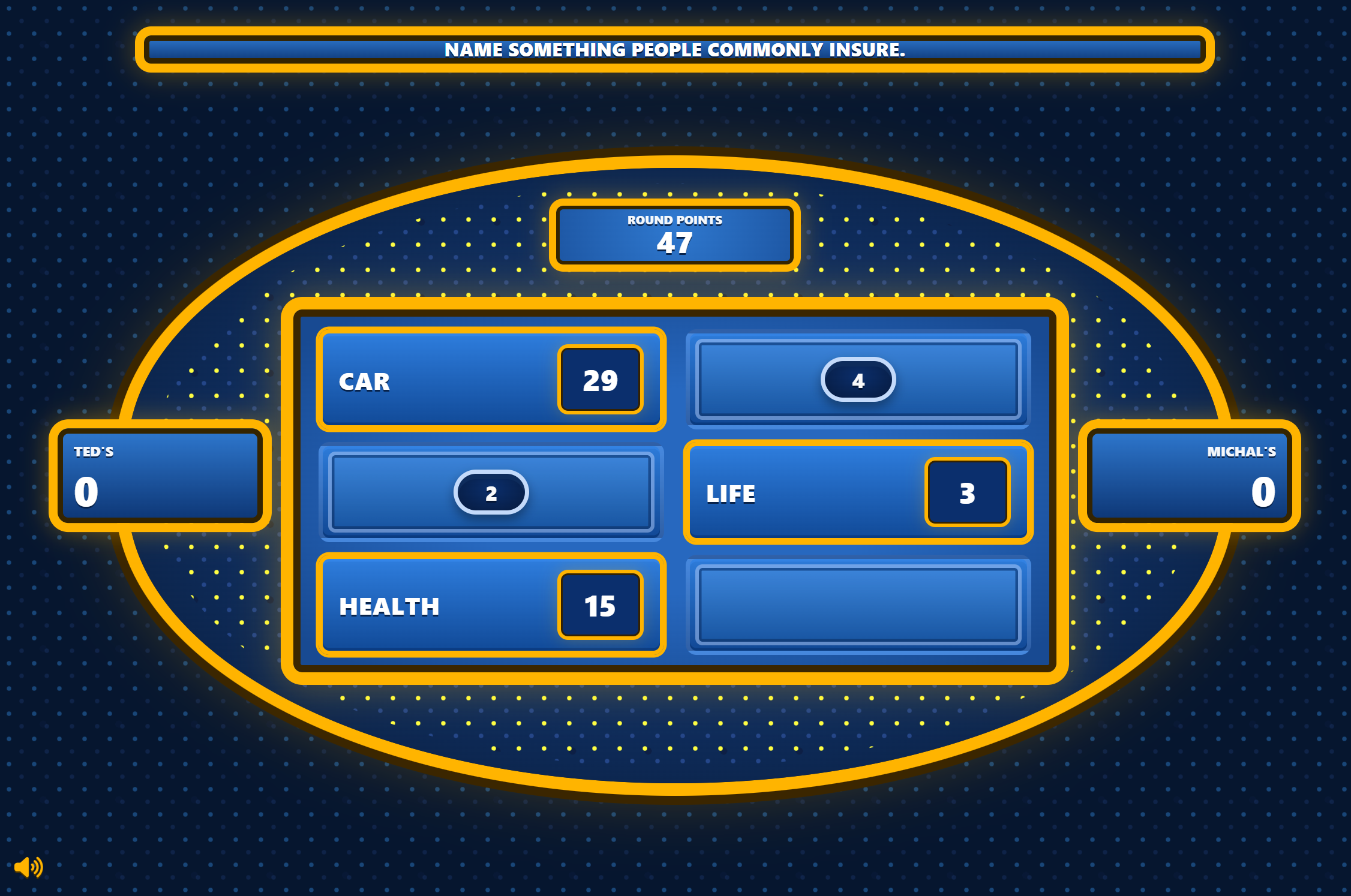
Projector or television: audience-facing game board.
Employees: two teams facing the screen.
With Familio Games, you can manage answer reveals, strikes and scoring from the host controller while displaying a separate player-facing board.
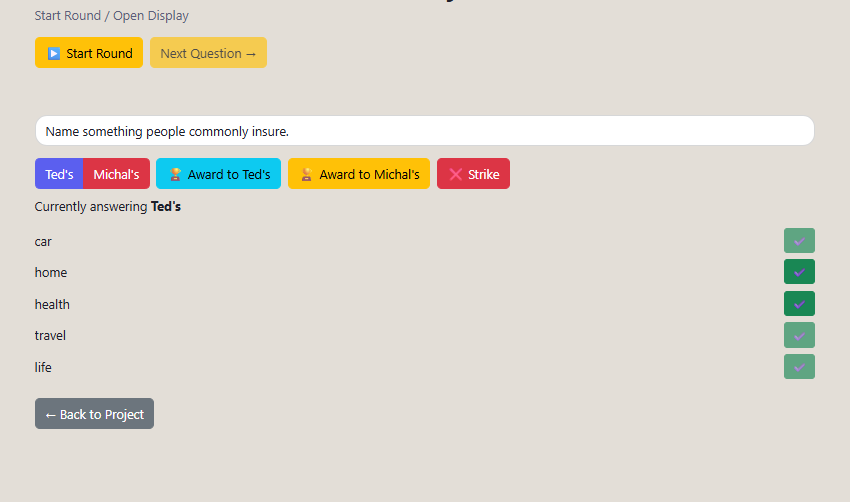
Test the display before the event.
Make sure the audience sees only the game board, not the private answer list.
Step 6: Start With a Face-Off
Choose one representative from each team.
Read the question.
The first player to signal gives an answer.
You can use physical buzzers, desk bells or a simple raised-hand rule.
If both players give valid answers, the higher-ranked answer wins control of the board.
For a simpler office format, let the winning team play immediately rather than introducing additional decisions.
Step 7: Reveal Answers and Add Strikes
The active team takes turns guessing.
A correct answer reveals one of the hidden responses.
An incorrect guess earns a strike.
After three strikes, the opposing team gets one chance to steal.
Step 8: Award the Round
For a simple scoring format:
- If the active team completes the board, it receives the round points.
- If it gets three strikes, the opposing team may steal.
- A successful steal awards the accumulated round points to the stealing team.
- An unsuccessful steal leaves the round points with the original team.
Then choose new representatives and continue.
Step 9: Finish With a Final Round
A final question with double points creates a natural conclusion.
You can also run a separate rapid-answer bonus round, but explain its rules before starting.
Announce the winning team, take a group photo if participants agree, and finish while the energy is still high.
15 Family Feud Questions for Work With Answers
Here are 15 workplace-friendly boards you can use for a company event.
All answers and points below are suggested gameplay examples, not actual employee survey findings. Totals intentionally vary rather than always equaling 100.
1. Name something people do right before a meeting starts.
AnswerPointsCheck email31Get coffee24Review notes18Chat with coworkers12Open the meeting link8
2. Name something that can interrupt a video call.
AnswerPointsInternet problems33Background noise24Someone talking over another person17A pet appearing12Microphone problems8
3. Name something you might find in an office kitchen.
AnswerPointsCoffee machine30Refrigerator24Microwave18Mugs13Snacks8
4. Name something employees look forward to on Friday.
AnswerPointsWeekend35Finishing work24Meeting friends15Relaxing at home12Sleeping in7
5. Name something people forget before joining an online meeting.
AnswerPointsUnmute microphone29Check camera22Open documents18Put on headphones12Check meeting time8
6. Name something that makes a good teammate.
AnswerPointsCommunication29Reliability25Willingness to help18Positive attitude12Respect9
7. Name something people keep on their office desk.
AnswerPointsComputer33Coffee cup22Notebook17Phone14Pen9
8. Name a reason someone might arrive late to a meeting.
AnswerPointsAnother meeting ran over31Traffic22Technical difficulties19Forgot the time12Couldn't find the room7

9. Name something people do during a lunch break.
AnswerPointsEat lunch34Talk to coworkers23Go for a walk16Check phone13Run an errand8
10. Name something that makes an office party memorable.
AnswerPointsFun games29Good food25Music17Funny moments13Prizes9
11. Name something coworkers often talk about during a break.
AnswerPointsWeekend plans30Food23Holidays19TV shows12Weather8
12. Name something that helps people concentrate at work.
AnswerPointsQuiet environment28Headphones23Coffee18Taking breaks14To-do list9
13. Name something people might bring to a company picnic.
AnswerPointsFood31Drinks24Blanket17Outdoor game12Sunscreen8
14. Name something employees appreciate about a good workplace.
AnswerPointsSupportive coworkers29Fair pay26Flexibility19Recognition13Development opportunities9
15. Name something that can make a team-building event more enjoyable.
AnswerPointsFun activities32Good atmosphere24Food and drinks17Friendly competition13Small prizes8
For more general rounds, browse 100 Family Feud questions and answers. You can mix office-specific boards with food, travel, everyday life and general-knowledge topics.
How to Create Company-Specific Family Feud Questions
Generic questions are useful because everyone can participate.
But company-specific questions can make an event feel more personal.
Try:
Name something everyone at our company uses every day.
Name a tradition people associate with our team.
Name something new employees learn during their first week.
Name a product or service our company offers.
Name something people enjoy about our office location.
For the most authentic results, survey employees before the event.
Collect Real Survey Answers
Send five to ten questions to employees who won't be playing, or collect anonymous responses from a wider group.
Count repeated answers.
Group equivalent responses together.
Rank the most common answers.
Then create the game board using those results.
For example, if 18 respondents say “coffee” and 12 say “email,” you can rank those answers accordingly.
Tell participants how many people were surveyed.
Don't describe invented points as real survey results.
Use Custom Questions in Familio Games
You can also create your own workplace boards directly in Familio Games, including questions, answers and point values.
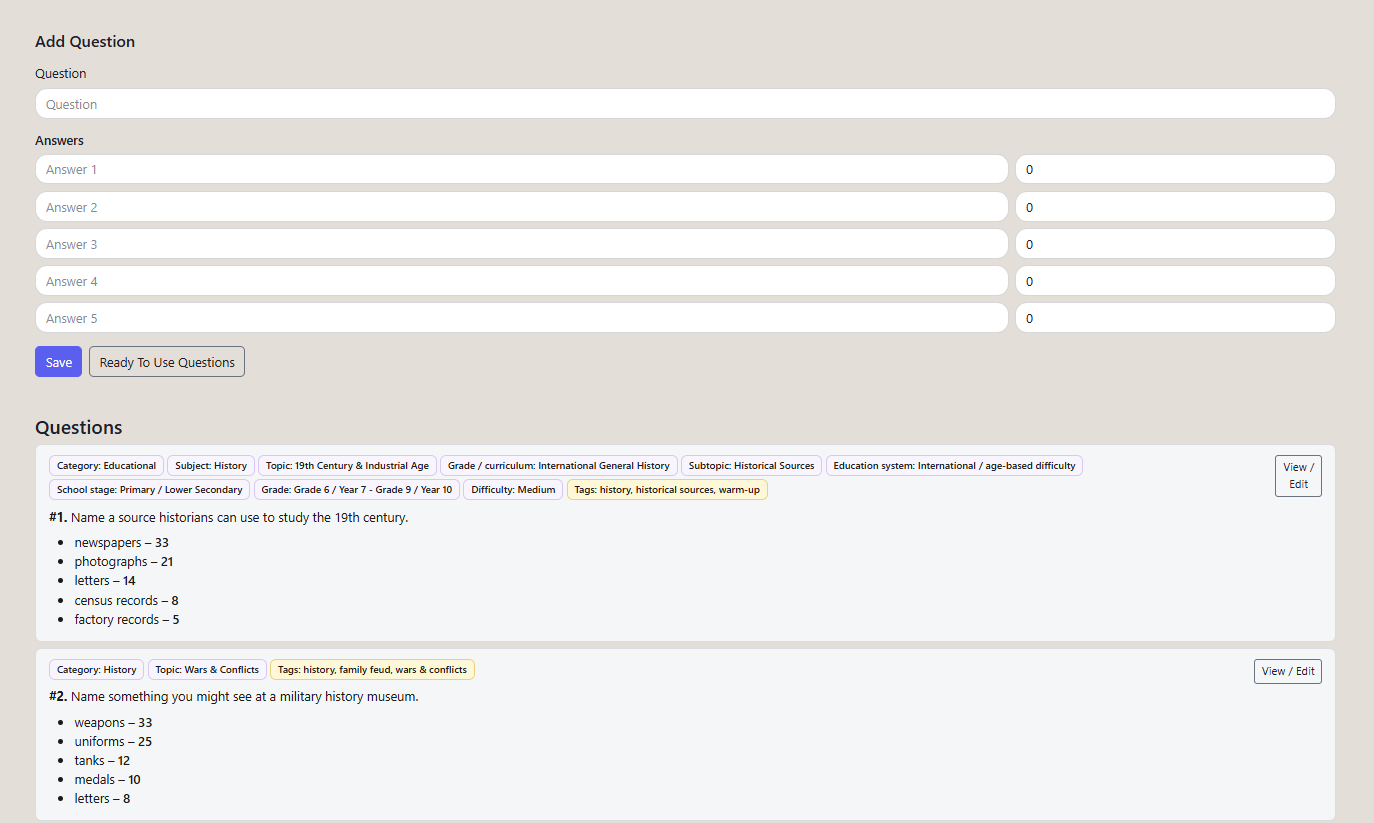
This is particularly useful for corporate events, because you can combine general questions with rounds about your industry, company culture or event theme.
How to Play Family Feud With 10, 20, 50 or 100+ Coworkers
Group size changes how you organize the game.
It doesn't have to change the game itself.
6–12 People: Everyone Plays
Divide the group into two teams.
Rotate answers between players.
Use three to six questions for a short session.
This works well for a small department or meeting icebreaker.
12–30 People: Two Large Teams
Create two teams.
Rotate face-off representatives and answering players.
Allow a few seconds for teammates to discuss before selected guesses.
This format works well for staff socials and team-building sessions.
30–50 People: Representatives and Audience
Divide the room into two sides.
Choose a smaller group of active representatives from each team.
Rotate those representatives between rounds.
Other employees can discuss answers, cheer and participate in occasional audience challenges.
50–100+ People: Hosted Corporate Game Show
For larger events, use a clearly visible screen, microphone and designated host.
Organize teams by department, table or assigned group.
Run several matches or select representatives from larger teams.
A tournament format can work well when the event has enough time.
For example:
Marketing vs Sales
Operations vs Finance
Winners vs Winners
Avoid expecting 100 people to take individual turns in one 30-minute game.
The format should scale through representation and rotation.
How to Host Virtual Family Feud for Remote Teams
Remote Family Feud works well when the host controls the board and shares only the audience-facing display.
You can run the event through Zoom, Microsoft Teams or Google Meet.
Virtual Setup
- Start the video meeting.
- Open the private game controller.
- Open the separate audience display.
- Share only the audience display with participants.
- Divide employees into two teams.
- Let players answer verbally or through designated spokespeople.
Never share the host controller if it contains the hidden answers.
For a more detailed remote setup, read our guide to hosting Family Feud online.
How to Manage Remote Teams
For smaller groups, keep everyone in the main call.
For larger groups, use breakout rooms for short discussions before a steal.
If breakout rooms would slow down the game, allow teammates to send suggestions privately to their captain.
Choose a clear answering rule before starting.
For example:
Only the current representative's spoken answer counts.
That prevents several people shouting different guesses over one another.
Hybrid Family Feud
Hybrid events need extra attention because remote employees can easily become spectators.
Give remote players scheduled face-off turns.
Make sure they can hear the host clearly.
Show the same audience board to everyone.
Avoid relying exclusively on physical buzzers in the office.
And don't let the in-person group make every decision before remote participants can contribute.
Three Ready-to-Use Family Feud Work Agendas
15-Minute Meeting Icebreaker
TimeActivity0–2 minExplain rules and divide teams2–5 minRound 1: easy office question5–9 minRound 2: everyday-life question9–13 minRound 3: double points13–15 minWinner and closing
Best for: team meetings, onboarding and short Friday activities.
30-Minute Team-Building Session
TimeActivity0–5 minWelcome, teams and practice round5–15 minThree main rounds15–24 minThree workplace-specific rounds24–28 minDouble-points final28–30 minResults and closing
Best for: department socials and remote teams.
60-Minute Office Game Show
TimeActivity0–10 minWelcome, rules and practice10–25 minFour general rounds25–40 minFour workplace rounds40–50 minChallenge and bonus rounds50–57 minFinal showdown57–60 minWinner and closing
Best for: office parties, offsites and larger corporate events.
These are planning templates. Adjust the number of questions based on how quickly your group answers.
How to Make Family Feud Inclusive at Work
A successful workplace game should encourage participation without making employees uncomfortable.
Rotate the Speakers
Don't let the most confident person answer every question.
Choose a different spokesperson for each round.
Allow Team Discussion
Some employees prefer contributing ideas privately rather than speaking in front of the whole company.
Brief discussion periods let them participate meaningfully.
Avoid Embarrassing Questions
Don't ask employees to guess:
- who earns the most money;
- who performs the worst;
- who is most likely to get fired;
- who has the most embarrassing personal habits;
- or anything involving private health, relationships or protected personal characteristics.
Choose questions about shared experiences instead.
Be Careful With Company Jokes
An inside joke can be funny to longtime employees and confusing to everyone else.
Mix company-specific rounds with universally understandable questions.
Make Participation Accessible
Provide visible written questions where possible.
Allow sufficient time for non-native speakers.
Avoid requiring physical movement, rapid button pressing or public performance as the only way to contribute.
A team-building event should create connection, not pressure.
Should You Give Prizes?
Prizes are optional.
For a casual office game, bragging rights may be enough.
For a larger event, consider:
A small team trophy
Coffee vouchers
A shared snack basket
Company merchandise
A certificate
The chance to choose the next team activity
Keep prizes appropriate to your workplace.
The event should feel friendly rather than high-stakes.
Common Mistakes When Hosting Office Family Feud
Too Many Questions
Ten good rounds are usually better than twenty rushed ones.
Prepare a few extras, but don't feel obligated to use them all.
Questions That Are Too Personal
Keep the focus on shared workplace experiences and everyday life.
No Clear Host
Someone must decide whether answers count, manage scoring and move the game forward.
Revealing Hidden Answers Accidentally
Test your screen-sharing setup before participants join.
Letting One Team Dominate
Rotate representatives and vary question difficulty.
Forgetting a Tie-Breaker
Prepare one extra question.
If teams finish with equal scores, use a final face-off or a clearly announced bonus round.
Overcomplicating the Rules
Explain the essentials in under two minutes.
Play a practice round.
Then start.
Family Feud vs Trivia for Team Building
Both can work well, but they encourage different types of participation.
FactorFamily FeudTriviaMain challengePredict popular answersRecall correct factsTeam discussionCentral to gameplayDepends on formatSpecialist knowledgeUsually unnecessaryOften usefulWorkplace customizationEasy with survey-style promptsEasy with company factsUnexpected funny answersCommonLess centralBest useSocial team competitionKnowledge challenges
If your main goal is a friendly, discussion-based activity, Family Feud is a strong choice.
If you're testing specific knowledge, trivia may be more appropriate.
You can also combine both formats in a longer event.
How to Turn Family Feud Into a Seasonal Office Event
Once employees know the rules, you can reuse the format throughout the year.
For Halloween, use questions about costumes, spooky situations and office Halloween traditions. The Halloween Family Feud Edition adds themed visuals and sounds while keeping the familiar hosting controls.
For Christmas, prepare questions about holiday food, traditions, office celebrations and seasonal activities.
For company anniversaries, create rounds about your organization's history and shared experiences.
For onboarding, use welcoming questions about office life, workplace tools and team traditions.
The format remains familiar, so employees spend less time learning rules and more time playing.
How to Run Family Feud at Work Without PowerPoint
You can create a game manually using PowerPoint, Google Slides or a spreadsheet.
But then you need to handle answer reveals, strikes, scoring and transitions yourself.
For a one-off activity, that may be perfectly reasonable.
For a professionally hosted corporate event, a dedicated game system can make the experience easier to manage.
Familio Games supports:
Ready-to-play and custom questions
Private host controls
Separate audience display
Answer reveals
Strikes
Live scoring
Custom team names
You can prepare your rounds beforehand, display the game on a television or projector and manage the event from a laptop.
That means less attention on operating slides and more attention on the people playing.
Your Pre-Event Hosting Checklist
Before the event, confirm:
- Event length and number of players
- Two teams and a host
- Questions and answers prepared
- Point values reviewed
- Backup questions available
- Projector or television connected
- Private controller not visible to players
- Sound tested, if using sound effects
- Microphone ready for large groups
- Face-off and steal rules explained
- Tie-breaker prepared
- Remote participants included, if applicable
- Final scores and closing planned
Ready to Host Family Feud at Work?
You don't need a complicated event plan to create a memorable team-building activity.
Start with two teams.
Choose questions people can relate to.
Give everyone a chance to contribute.
And let the competition create the energy.
Whether you're planning a 15-minute meeting icebreaker, a department social or a larger corporate event, Family Feud offers a flexible format that can be adapted to your audience.
With Familio Games, you can create a workplace Family Feud game with ready-made or custom questions, keep the hosting controls private and display a separate game board for your coworkers.
Turn your next team event into a live game show.
Frequently Asked Questions
How do you play Family Feud at work?
Divide coworkers into two teams, ask survey-style questions and let players guess hidden answers. Correct guesses reveal answers and earn points, while incorrect guesses earn strikes. After three strikes, the opposing team can attempt to steal the round.
Is Family Feud good for team building?
It can be an effective social team-building activity because coworkers discuss possible answers, cooperate and compete together. Its usefulness depends on inclusive facilitation, appropriate questions and the event's goals.
How many people can play office Family Feud?
Small groups can play with everyone taking turns. Larger groups of 30, 50 or 100+ can use rotating representatives, audience participation or tournament formats.
How long should a workplace Family Feud game last?
A short icebreaker can take 10–15 minutes. A typical team-building session might last 30–45 minutes, while a larger office party game can fill approximately one hour.
Can you play Family Feud on Zoom or Microsoft Teams?
Yes. A host can share the audience-facing game board through a video call while keeping the private controller and answers hidden.
What are good Family Feud questions for coworkers?
Good questions cover meetings, coffee, office kitchens, remote work, workplace habits, teamwork and everyday experiences. Avoid questions that embarrass employees or involve sensitive personal information.
Do we need real survey answers?
Not necessarily. You can use suggested answers and point values for a casual game. If you want to present the answers as actual survey results, collect and count responses beforehand.
Can we create company-specific Family Feud questions?
Yes. Questions about company culture, shared experiences, products and office traditions can make the game more personal. Familio Games allows custom questions, answers and point values.
Do employees need their own devices?
Not for a shared-screen hosted format. A laptop for the host and a television or projector for the audience can be enough.
Do we need a professional host?
No. An HR representative, office manager, team leader or volunteer can host a smaller game. A professional presenter may be useful for larger corporate events.
Where can I create Family Feud for a company event?
You can use the Familio Games team-building platform to prepare questions, manage the game and display a player-facing board for an office party or corporate event.